Part I: Pragmatic approach to a validated R environment

Achieving completeness, accuracy and reliability

Thomas Asendorf

September 8, 2025

Outline

  1. GCP/EMA Requirements for computerized systems
  2. R and possibilities for Validation
    • R installation (base, recommended)
    • Other packages
    • Scripts
  3. Exemplary Implementation
  4. Outlook

GCP requirements for computerized systems

ICH E6 (R3) (23.07.2025)

EMA Guideline on computerised systems and electronic data in clinical trials (07.03.2023)

Training

Example: users can attend structured courses during their studies or attend courses in later phases of their career.

Validation
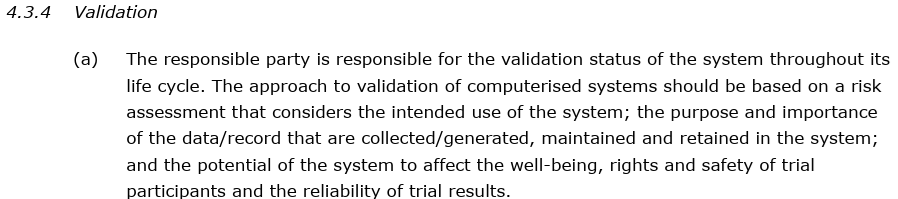
  • “…based on a risk assessment…”
  • “…potential to affect…reliability of trial results.” \(\rightarrow\) Relevant for R

Validation

validation_b validation_c validation_d

  • Demonstrate completeness, accuracy and reliability

Validation: Completeness

  • The system must ensure that all data are captured, stored, and retrievable without loss
  • No selective recording or silent data drops
  • Traceability is part of completeness

Examples:

  • When importing a clinical dataset (e.g. from .csv file), the import function must not silently drop columns or rows
  • If a data set contains missing values, R must represent them correctly (e.g., NA)
  • Date- and time formats are consistent

Validation: Accuracy

  • The system must process and output data correctly, as intended, without error or distortion.
  • Outputs should reflect the true values of the input data, according to defined algorithms.

Examples:

  • The mean blood pressure across patients must return the correct mathematical result (no miscalculations)
  • Statistical tests (e.g., a log-rank test) must produce results consistent with reference implementations or expectations
  • Validation includes running known reference data sets through R functions and comparing results

Validation: Reliability

  • The system must operate consistently over time, under expected conditions, and produce reproducible results
  • Same inputs result in same outputs, regardless of when or by whom the analysis is run

Examples:

  • Running a data processing script today and next week (same inputs, same R environment) should give identical results
  • If a package update changes results, your validation framework must detect this and control package versions (renv, Docker).

Validating R Installation

R: Regulatory Compliance and Validation Issues A Guidance Document for the Use of R in Regulated Clinical Trial Environments (18.10.2021)

R: Software Development Life Cycle A Description of Rs Development, Testing, Release and Maintenance Processes (18.10.2021)

Testing and Validation

  • Provided by the R Development Team to verify correctness of R’s base functionality
  • Detects regressions and platform-specific issues after installation or modification
  • Found in the tests/ subfolder of the R source distribution (e.g., R-4.5.1/tests/)
  • Includes .R scripts and expected output files (.Rout.save).
  • Main functions to run tests are:
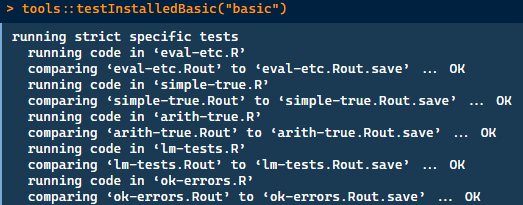
    • tools::testInstalledBasic(): for testing base R functionalities
    • tools::testInstalledPackage(): for testing a specific package
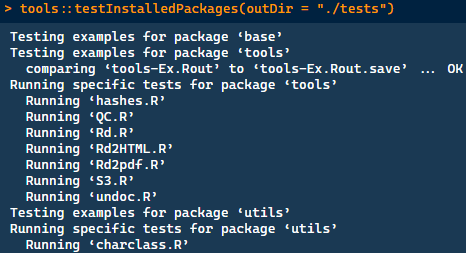
    • tools::testInstalledPackages(): for testing base and recommended packages

Testing and Validation: Examples

Example: tools::testInstalledBasic("basic") to test base R functionalities
Testing and Validation: Examples

Example: tools::testInstalledPackages(outDir = "./tests") to test base and recommended packages
Testing and Validation: Examples

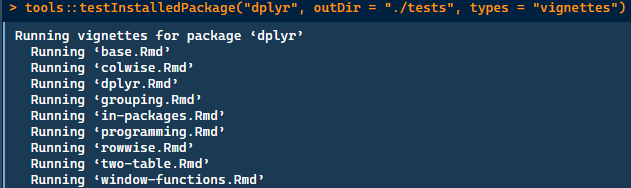
Example: For testing specific packages

  • tools::testInstalledPackage("dplyr", outDir = "./tests", types = "examples")
  • tools::testInstalledPackage("dplyr", outDir = "./tests", types = "tests")
  • tools::testInstalledPackage("dplyr", outDir = "./tests", types = "vignettes")
Testing and Validation: Examples

Notes on testing packages:

  • Not all packages have (good) examples, tests or vignettes
  • Quality of examples, tests, and vignettes depends on the package maintainers
  • Running vignettes may require installation of dependencies, e.g., install.packages("dplyr", dependencies = TRUE)
  • Check specific vignettes for more information, e.g., vignette("window-functions", package = "dplyr")

Validating R Packages

  • R packages are provided by third party maintainers
  • Can vary greatly in programming quality and active maintenance
  • Besides the presented methods, it is possible to perform risk assessment

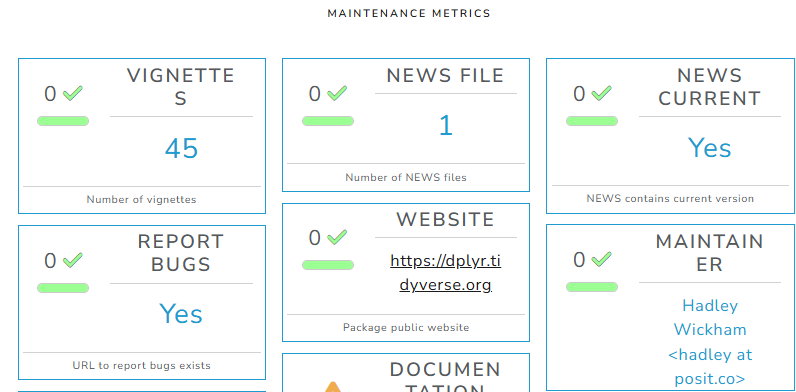
Validating R Packages: Riskassessment Tool

https://github.com/pharmaR/riskassessment/

Assess risk based on specific metrics, such as:

  • vignettes
  • current news
  • has bug report url
  • has a website
  • has maintainer
  • uses source control
  • bug closure rate
  • number of dependencies
  • test coverage
  • reverse dependencies
  • first version release
  • latest version release
  • package downloads

Validating R Packages: Riskassessment Tool

Generate reports based on this assessment
Validating R Scripts

Incorrect applications can occur:

  • Due to lack of expertise on the applied methodology
  • Programming errors

Validating R Scripts

Mitigate the risk of errors by:

  • Double programming
  • Code reviews
  • Running simulations

Example: For code with the potential to affect trial results, have second expert either review or even rewrite the code

Exemplary Implementation

Exemplary Implementation: Installation Validation

  • Installation Validation is a bash script which executes all tests, examples and vignettes from basic and recommended packages
  • Results are reported together with the version and sessionInfo() in a validation report
  • Corresponds to installation qualification and operational qualification
Validation Aspect Installation Validation
Completeness OK
Accuracy
Reliability

Exemplary Implementation: Code Review

  • Risk-Based review of R-code, especially final analysis of clinical trials
  • Content of the analysis is compared to statistical analysis plan and study protocol
  • In certain cases, code needs to be programmed a second time
Validation Aspect Installation Validation Code Review
Completeness OK
Accuracy OK
Reliability

Exemplary Implementation: Guideline on Reproducibility

  • Using seeds (correctly) in R simulations
  • Emphasize importance of the package renv and sessionInfo()
  • Enforces use of version control git
Validation Aspect Installation Validation Code Review Guideline on Reproducibility
Completeness OK
Accuracy OK
Reliability

Outlook

  • When writing packages, keep validation in mind
  • Possibilities for validation of external packages?
  • Use AI for validation?

License information